
Automating OpenAPI delivery with GitHub Actions
/ 7 min read
Updated:Table of Contents
Hello! It’s been a while since my last post.
Back in May, I shared that I was building a new project called Beyond the Docs. I started the project because I wanted to learn how to build the tools I document. I’m happy to share that I completed v1.0.0 of the project, which was primarily focused on building three tools:
- A CLI (SpecGate)
- An API (Fstop)
- A Python SDK for the API
I now have a nice ecosystem of developer tools that are all connected in some way. The Fstop API generates an OAS file, SpecGate validates that OAS file, and the OAS is used to generate the API reference docs and Python SDK.
I built the tools, but then I discovered a new problem: keeping them all in sync.
The problem
Whenever I made a change to the Fstop API, I had to regenerate the OAS, copy it to the SDK, regenerate the SDK, move the OAS to the docs repository, and regenerate the API reference docs. A very manual process.
Keeping everything in sync depended on me remembering to run scripts. For example, if I forgot to copy the OAS to the docs repo, the API reference page would become stale.
Eventually, I thought, Yeah, this won’t do. There has to be a way to automate all this.
So I decided to see if GitHub Actions could help me.
The goal
I started with a simple idea (at least, it seemed simple).
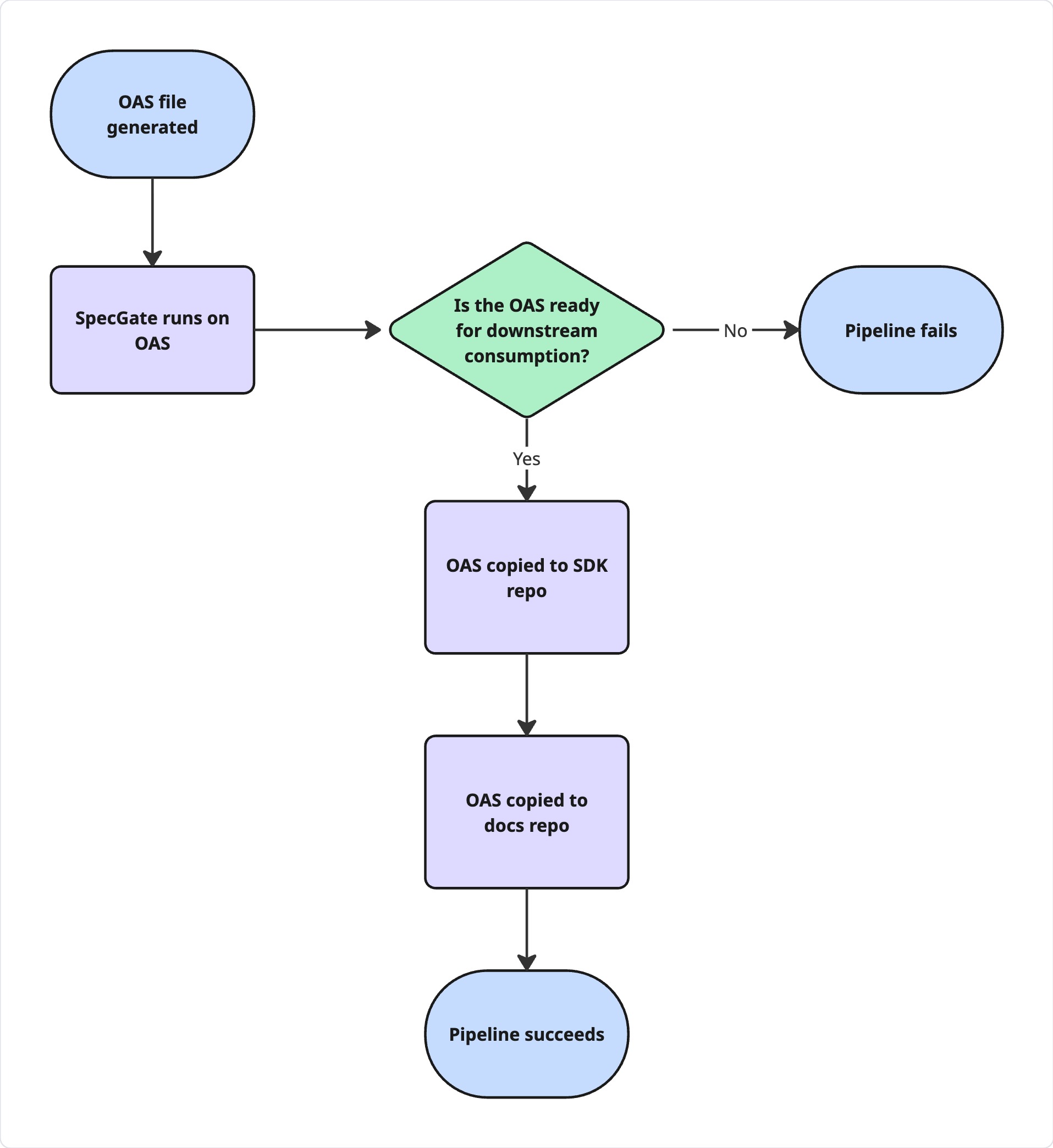
When the OAS changes, the workflow should run. Ideally, the process would be:
- Validate the OAS with SpecGate.
- If the OAS passes validation, copy it to the SDK repo and regenerate the SDK with Speakeasy.
- If the OAS passes validation, copy it to the docs repo and regenerate the API reference docs.
- Push the changes to their respective repos.
As I built the workflow, I asked myself several questions.
When should the workflow run?
With most GitHub Actions, something needs to cause the workflow to run. Those are called workflow triggers. In a GitHub workflow file, you define the triggering event using the on keyword.
on: push: branches: ["main"] paths: - "schema.yml"This code sample says, “If there’s a push to the main branch and if the merge includes changes to schema.yml, start the workflow.”
How do I make sure the OAS is ready for consumption?
The next question was where SpecGate should fit in the workflow. I wanted SpecGate to act like a gate. If the OAS didn’t pass Specgate’s readiness rules, nothing should happen downstream.
The SpecGate job looks like this:
run-specgate:    runs-on: ubuntu-latest    steps:      - uses: actions/checkout@v4 # Checks out the Fstop API repo      - uses: actions/setup-go@v5        with:          go-version: '1.21'
      - name: Install SpecGate        run: go install github.com/itsdeannat/specgate@latest
      - name: Create SpecGate config        run: $(go env GOPATH)/bin/specgate init
      - name: Check OpenAPI spec        run: $(go env GOPATH)/bin/specgate check schema.yml
The job installs SpecGate on the GitHub Actions runner, creates the required configuration file, and then runs the check. If the check fails, the pipeline fails.
How does the workflow access another repository?
This part of the workflow required the most amount of work.
The SDK lives in a separate repo from the API. I needed the workflow that lives in the API repo to check out the SDK repo and push any new changes to it. I figured I’d just check out the SDK repo, but I ran into several permissions issues.
Eventually, I learned that I had to create a personal access token (PAT) that gave the workflow access to the SDK repo. After I created the token, I stored it as a GitHub Actions secret and passed it to the checkout action.
This is what the first part of the job looks like:
update-sdk:    needs: run-specgate    runs-on: ubuntu-latest    steps:      - name: Check out API repo        uses: actions/checkout@v4        with:          path: 'api'
      - name: Check out SDK repo        uses: actions/checkout@v4        with:            repository: 'itsdeannat/fstop-python-sdk'            path: 'sdk'            ref: 'dev'            token: ${{ secrets.PAT_TOKEN }}
There are two other things to point out here. The first one is the needs: run-specgate keyword.
The needs keyword establishes a dependency on the run-specgate job. If the run-specgate job fails, the update-sdk job doesn’t run.
The second thing to point out is that I’m checking out two different repositories into two different directories on the runner: api and sdk. This way I can access the OAS at api/schema.yml and the SDK repository with sdk/. Both repositories are now available on the runner!
How do I get the OAS into the SDK repo?
This part was pretty straightforward. This job installs Speakeasy on the runner, copies the OAS from the API repo to the SDK repo, and runs the Speakeasy CLI.
- name: Install Speakeasy        run: curl -fsSL https://go.speakeasy.com/cli-install.sh | sh
      - name: Copy OAS        run: cp api/schema.yml sdk/schema.yml
      - name: Run Speakeasy        env:          SPEAKEASY_API_KEY: ${{ secrets.SPEAKEASY_API_KEY }}        run: |          cd sdk          speakeasy run
Essentially, this copies the OAS into the SDK repo and uses it to regenerate the SDK.
How do I push changes to the SDK repo?
If there are any changes to the SDK, they need to be committed to the SDK repo. The final step of the workflow configures Git with the GitHub Actions identity, stages the changes on the dev branch, creates a commit, and then pushes the changes to the dev branch.
- name: Commit SDK changes run: | cd sdk git config user.name "github-actions[bot]" git config user.email "github-actions[bot]@users.noreply.github.com" git add . git commit -m "Regenerate SDK from API changes" || echo "No changes to commit" git push https://x-access-token:${{ secrets.PAT_TOKEN }}@github.com/itsdeannat/fstop-python-sdk.git HEAD:devThe || echo "No changes to commit" bit is important. If Speakeasy doesn’t produce any changes, there’s nothing to commit. The workflow continues from there.
After that, the changes are available on the dev branch. I can open a PR to review the changes and merge them into main.
How do I update the API reference docs?
Using the same workflow! The update-api-reference-docs job essentially follows the same pattern as the SDK job. It also depends on the run-specgate job, so it only runs if the OAS is ready.
needs: run-specgate    runs-on: ubuntu-latest
    steps:      - name: Check out API repo        uses: actions/checkout@v4        with:          path: 'api'
      - name: Check out docs repo        uses: actions/checkout@v4        with:            repository: 'itsdeannat/fstop-docs'            path: 'docs'            ref: 'dev'            token: ${{ secrets.PAT_TOKEN }}
The workflow copies the OAS to the docs repo, runs Redocly to generate the API reference page, and then commits the changes.
- name: Copy OAS        run: cp api/schema.yml docs/schema.yml
- name: Generate reference docs  run: |    cd docs    npx @redocly/cli@latest build-docs schema.yml --output=public/api-reference.html
- name: Commit doc changes  run: |    cd docs    git config user.name "github-actions[bot]"    git config user.email "github-actions[bot]@users.noreply.github.com"    git add .    git commit -m "Regenerate reference docs from API changes" || echo "No changes to commit"    git push https://x-access-token:${{ secrets.PAT_TOKEN }}@github.com/itsdeannat/fstop-docs.git HEAD:dev
What I learned
Once I had the CLI, API, and SDK working on their own, I started thinking a little less about the individual tools and more about how they work together.
How do I make sure that API changes get to the SDK with little manual intervention? Where should validation happen? What happens if a step fails?
Asking all of the questions is what led me to build this orchestration layer for Beyond the Docs.
The tools are still the core of Beyond the Docs, but if I want to continue expanding this project and developing the tools, I’ll need some orchestration in place to help me do that.
What’s next
Right now, the pipeline validates the OAS and delivers the downstream artifacts. But generating an artifact doesn’t necessarily mean that it works.
It would be good to add some tests for the SDK or even performing documentation quality tests, like checking links or running a linter. So I see the next iteration of this workflow focusing more on testing and validation. Generally speaking, v2 of Beyond the Docs is focusing on orchestration, testing, and validation.
v1 of Beyond the Docs is where I learned to build the tools, and v2 is where I’m learning how to make sure the system is actually trustworthy.